The Inventory Optimization Tool Built the Way Supply Chain Planners Actually Work
Stop spending 3–5 days every quarter rebuilding your inventory analysis from scratch. This Excel-based inventory optimization tool calculates safety stock, reorder points, days on hand, and inventory turns, then flags your excess and obsolete stock, from a single data load.
Instant download · Excel (.xlsm) · Works with any ERP export · Lifetime access

Your inventory data is sitting there.
The decisions aren't.
From raw ERP data to stock decisions, in minutes
Every supply chain team has the same challenge: too much stock in the wrong places, not enough in the right ones. Inventory ties up working capital, inflates carrying costs, and, when it goes obsolete, writes itself off directly against your bottom line. Most organisations know this. Few have a structured, repeatable process to act on it.
A good inventory optimisation model calculates safety stock using actual demand variability, classifies your stock into usable, excess, and obsolete buckets, and produces clear proposals, stock to non-stock conversions, safety stock adjustments, that a planner can act on without a PhD in statistics.
This tool is built by a practitioner, for practitioners. Load your item-level data, run the model, and walk into your next S&OP or finance review with a structured inventory optimisation analysis, not a half-finished spreadsheet.
How much stock do we actually need?
Safety stock and reorder points calculated from your own demand and lead time data, not guesswork.
Where is working capital tied up?
COGS, on-hand value, and inventory turns reveal exactly where cash is locked in slow-moving stock.
What's excess or obsolete?
Inventory profiling segments every SKU into usable, excess, and obsolete, with months-of-stock groupings.
What actions should we take?
Optimisation proposals, stock-to-non-stock conversions, safety stock resets, ready to take into your next planning review.
Every inventory output your team needs, pre-calculated
Load your item-level data into the input template, run the model, and every metric updates automatically. No manual formula writing. No data science degree required.
Excel Inventory Optimization Model
The core .xlsm workbook. Macro-enabled for automated calculations across your full SKU list.
Data Input Template (drag-and-drop)
Pre-structured input file for fast data entry from any ERP or inventory system export. Paste and go.
Safety Stock Calculator
Calculated from your actual demand variability and supplier lead time data, not textbook averages.
Reorder Point Calculation
Per-SKU reorder points based on your data. Know exactly when to replenish each item before stockouts occur.
Days On Hand & Inventory Turns
Turns ratio and DOH by SKU or category. Benchmark against your targets and spot underperforming lines immediately.
Excess & Obsolete Profiling
Segments every item into usable, excess, and obsolete buckets. Months-of-stock groupings included for fast prioritisation.
SKU-level Optimisation Proposals
Actionable output: stock-to-non-stock conversions, safety stock adjustments, and reclassification recommendations ready for your planning team.
Executive Summary Tab
A boardroom-ready summary of inventory segmentation by product category, with excess and obsolete breakdowns and strategic proposals.
DIY Training Document & Video
Step-by-step instructions covering data preparation, model setup, and interpreting outputs. Any planner on your team can run this from day one.
See the Inventory Optimization Tool in action
Watch this short walkthrough to see how the Inventory Optimization Tool calculates safety stock, reorder points, and identifies excess inventory.
See what you'll be working with
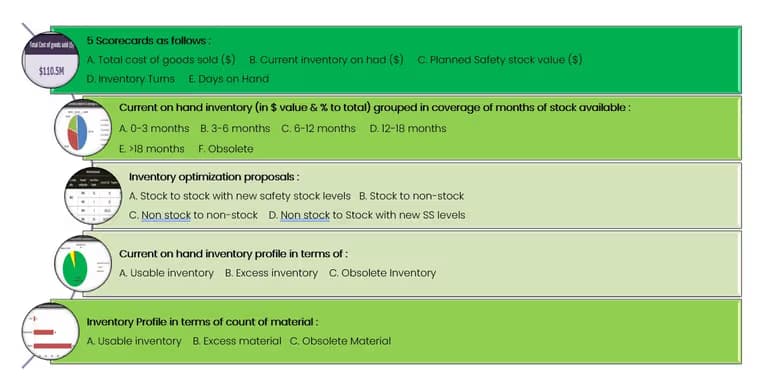
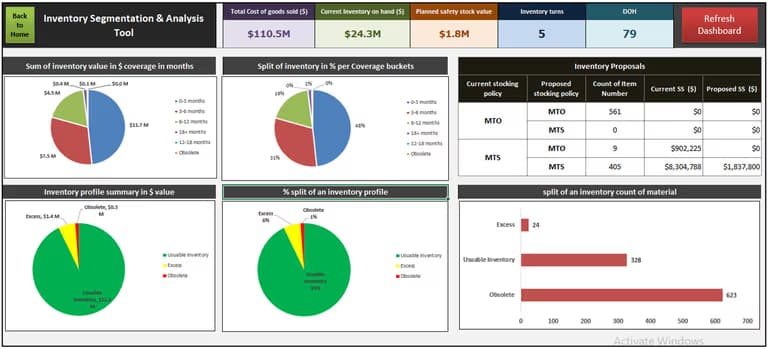
Screenshots from the actual template, the input sheet and output dashboard exactly as they appear when you open the file.
Designed for inventory planners.
Not data scientists.
Paste-and-run data input
Export item-level data from SAP, Oracle, or any ERP. Paste into the pre-structured input template and run the model. No manual formula building required.
Automated safety stock calculation
Safety stock is derived from your actual demand variability and lead time data, not generic industry averages. Accurate, defensible numbers for every SKU.
Inventory profile segmentation
Every SKU classified into usable, excess, or obsolete. Months-of-stock groupings give you a clear picture of where your working capital is locked up.
3–5 days of work in minutes
Tasks that typically consume a full working week of manual ERP analysis are completed in a single session. Repeatable every planning cycle.
Actionable optimisation proposals
The model outputs specific proposals, stock-to-non-stock conversions, safety stock resets, that your planners can act on immediately, not just data to stare at.
Fully customisable
Adapt categories, thresholds, and labels to match your business structure. The model is flexible enough to work across wholesale, distribution, and manufacturing environments.
From raw inventory data to decisions in four steps
Export your item data
Pull item master, demand history, lead times, and on-hand from your ERP (SAP, Oracle, or any system). CSV or Excel format.
Load into the input template
Paste your data into the provided template. Column headers are pre-mapped. Takes 5–10 minutes.
Run the model
Click refresh. The model calculates safety stock, reorder points, turns, DOH, and profiles every SKU into usable, excess, or obsolete.
Review proposals & take action
The model outputs optimisation proposals, stock-to-non-stock conversions, and safety stock resets. Ready to implement or present.
Built for the people who have to
defend inventory levels to finance
Inventory managers and supply chain planners
If you have to defend stock levels, write-off requests, or safety stock policies to finance or operations, this tool gives you the data-backed analysis to make your case.
CFOs and finance teams who want visibility
Working capital tied up in inventory is one of the biggest levers CFOs have. This tool shows where cash is locked, what can be liquidated, and which SKUs are burning money.
Operations directors managing distribution or manufacturing
When you are responsible for stockouts and excess at the same time, you need structured optimisation proposals that balance service level with inventory investment.
Supply chain consultants and improvement teams
If you are running an inventory optimisation project for a client, this model gives you a ready-made framework to structure the analysis, present findings, and track progress.
Every inventory optimisation question people ask,
answered by your own data
Inventory optimisation sets the right stock levels per SKU, balancing service levels against carrying costs. It reduces excess and obsolete stock while preventing stockouts that damage customer relationships.
Use demand variability and supplier lead time from your ERP data. This tool does the calculation automatically, paste your data, run the model, get your numbers.
Segment your stock by months of cover. Items with excessive cover are candidates for stock-to-non-stock conversion or safety stock reduction, without touching your fast-moving lines.
For most mid-size operations, Excel is entirely sufficient. Specialist software adds cost and complexity. This model delivers the same outputs for a fraction of the price.
Inventory turns, days on hand, service level, and the ratio of usable to excess stock. This tool calculates all four and flags where action is needed.
With this tool, a full analysis takes minutes, not days. Tasks that normally consume 3–5 days of manual ERP work are completed in a single session.
About the author

Frequently asked questions
What does this inventory optimisation tool actually do?
It calculates safety stock, reorder points, inventory turns, and days on hand from your data. It then profiles every SKU into usable, excess, and obsolete categories with actionable proposals.
What data do I need to use it?
Item-level data from your ERP: SKU codes, demand history, lead times, on-hand quantities, and COGS. Any system that exports to Excel or CSV works.
Does it work with SAP, Oracle, or other ERP systems?
Yes. The tool is system-agnostic. If your ERP exports to Excel or CSV, you can use it. SAP, Oracle, Dynamics, and bespoke WMS systems all work.
I'm not a data analyst. Is this too complex for me?
No. The DIY training document and video tutorial walk you through every step. If you can use Excel and export from your ERP, you can run this model.
Can I customise the model for my business?
Yes. Categories, thresholds, and labels are all editable. The model adapts to wholesale, distribution, and manufacturing environments without structural changes.
What format will I receive after purchase?
Instant download: Excel model (.xlsm), input template, DIY training document (Word + PDF), and video tutorial access. Works on Excel 2016 or later, Windows and Mac.
Ready to optimize your inventory?
Get the Inventory Optimization Tool today and start making data-driven decisions about safety stock, reorder points, and excess inventory.
Instant download · One-time payment · No subscription · Lifetime access


